
Quick Answer: On-page SEO is the process of optimizing individual pages on your website so search engines can understand what they are about and rank them for the right keywords. The key elements include your title tag, H1 heading, meta description, keyword placement, internal links, image alt text, and page speed. Fixing these consistently across your site is one of the fastest ways to improve your Google rankings without needing a single new backlink.
A small cleaning business in Sydney had been online for two years. Decent website, good reviews, solid service. But they were nowhere on Google for “house cleaning Sydney” or any related term.
A basic on-page audit took 30 minutes. Every page title just said the business name. There was no H1 on the homepage. The service pages had no keywords anywhere. And not one image had alt text.
Four weeks after fixing those issues, three pages were ranking on page one.
On-page SEO is often the quickest win available for small businesses. And most of the mistakes are straightforward to fix once you know what to look for.
What Is On-Page SEO and Why It Matters for Your Rankings
On-page SEO refers to every optimisation you make directly on a webpage to help it rank better in search results. This includes the words on the page, the structure of the content, the technical metadata attached to it, and the links within it.
Unlike off-page SEO, which depends on what other websites do (like linking to you), on-page SEO is entirely within your control. You can start fixing it today without needing anyone else’s help.
According to Semrush’s 2026 on-page SEO research, many of the same on-page practices that help you rank in traditional Google results also improve your chances of appearing in AI-generated answers. Getting this right is no longer just about Google rankings. It is about being visible across every surface where your customers are searching.
The Complete On-Page SEO Checklist for Small Businesses
Work through this checklist for every key page on your site. Start with your homepage and your most important service pages, then apply it to every new blog post you publish.
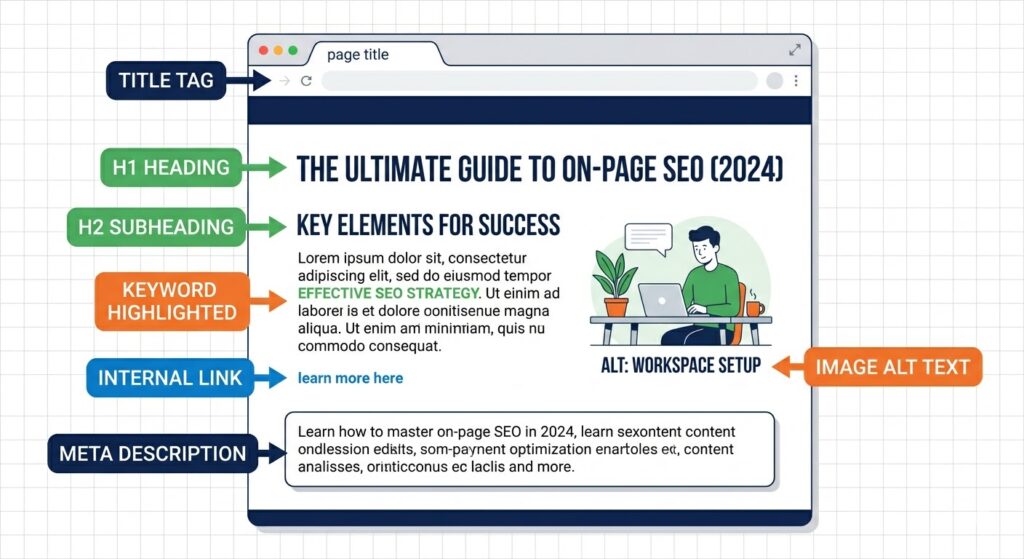
1. Title Tag: Your Most Important On-Page Element
Your title tag is what appears as the clickable headline in Google search results. It is the single most important on-page SEO element on any page.
Every page needs a unique title tag. It should include your primary keyword naturally and stay between 50 and 60 characters so it does not get cut off in results.
Bad example: “Home | DigitixLab” Good example: “SEO Services for Small Businesses in the USA | DigitixLab”
Include a power word where it fits naturally. Words like “complete,” “proven,” “fast,” or “free” improve click-through rates because they communicate value before the reader even visits the page.
2. Meta Description: Sell the Click
Your meta description does not directly affect your rankings, but it directly affects whether people click your result. A well-written meta description acts like a mini advertisement in the search results.
Keep it between 150 and 160 characters. Include your focus keyword naturally. Make it specific and tell the reader exactly what they will get from the page.
Do not write your meta description as a keyword list. Write it as a sentence that speaks to the reader.
3. H1 Heading: One Per Page, Always
Every page on your site should have exactly one H1 heading. It should include your primary keyword and clearly communicate what the page is about.
Many WordPress themes and page builders accidentally create pages with no H1, or with multiple H1 tags. Check this on your key pages using your browser’s inspect tool or a free tool like Screaming Frog.
Your H1 does not need to be identical to your title tag. They can be similar but vary slightly for readability.
4. H2 and H3 Headings: Structure and LSI Keywords
Use H2 headings to break your page into logical sections. Use H3 for subsections within those. This structure helps Google understand your content and helps readers scan quickly.
Place LSI (related) keywords in your H2 and H3 headings rather than repeating the exact primary keyword. For a page about on-page SEO, your headings might include: “how to optimise title tags,” “internal linking best practices,” and “image optimisation for SEO.” These variations build topical relevance without looking like keyword stuffing.
5. Keyword Placement: Where and How Many Times
Your focus keyword should appear in the first 100 words of your content naturally. It should also appear in your title tag, meta description, one H2 heading, and two to three more times throughout the body.
Do not force it. If a sentence sounds awkward with the keyword in it, rewrite the sentence. Google is good at understanding context. Keyword stuffing is a ranking penalty risk, not a ranking boost.
For a 1,500-word article, your focus keyword should appear around four to six times. That is a natural density. LSI keywords should fill the rest of the relevant mentions.
6. Internal Links: Guide Google and Your Readers
Every page should link to at least two or three other relevant pages on your site using descriptive anchor text. This distributes link equity across your site, helps Google crawl it efficiently, and keeps readers engaged longer.
For example, a post about on-page SEO should link to your article on technical SEO fixes and your website speed optimisation guide. That is exactly the kind of topical cluster linking that builds authority over time.
When you write the anchor text for an internal link, use descriptive phrases rather than “click here” or “read more.” “Our guide to fixing technical SEO errors” is far more useful than “click here.”
7. Image ALT Text: Free SEO You Are Probably Missing
Every image on your site should have an ALT text description. ALT text serves two purposes: it tells visually impaired users what an image shows, and it tells Google what the image is about so it can appear in image search results.
Keep ALT text descriptive but concise. Include your keyword where it fits naturally, but do not force it onto every image. A keyword in the ALT text of your main featured image is a clean, low-effort win.
8. URL Structure: Keep It Clean and Keyword-Rich
Your page URL should be short, readable, and include your focus keyword. Avoid long strings of numbers or irrelevant words.
Bad: digitixlab.com/p=4521 Good: digitixlab.com/on-page-seo-checklist-small-business
Set your WordPress permalink structure to Post Name in Settings, then Permalinks if you have not already.
9. Page Speed: A Ranking Factor You Cannot Ignore
Google PageSpeed Insights is free and takes 30 seconds to use. Run your key pages through it and fix whatever it flags as high priority.
Common small business site speed issues include uncompressed images, too many plugins, no caching, and no lazy loading. Most can be fixed with a lightweight caching plugin like WP Rocket or LiteSpeed Cache.
A page that loads slowly does not just lose rankings. It loses visitors. Research from SiteGround’s 2026 SEO guide shows that pages loading in over three seconds lose a significant portion of users before they even see the content.
10. Schema Markup: Tell Google Exactly What Your Page Is
Schema markup is structured data code that helps Google understand the specific type of content on your page. For blog posts, use Article or Blog Posting schema. For your services page, use Service schema. For your FAQ sections, use FAQ schema.
If you are using Rank Math or Yoast SEO, the basic Article and BlogPosting schema is generated automatically. FAQ schema needs to be added manually either through a Custom HTML block in the editor or via the schema builder in your SEO plugin.
We covered exactly how to add FAQ schema to your WordPress posts in detail. If you missed it, the on-page SEO services at DigitixLab include a full schema setup as part of our optimization work.
On-Page SEO Checklist: Quick Reference Table
| Element | What to Do | Priority |
|---|---|---|
| Title tag | Include focus KW, 50-60 characters, power word | Critical |
| Meta description | 150-160 chars, include KW naturally, sell the click | High |
| H1 heading | One per page, include focus KW | Critical |
| H2/H3 headings | Use LSI keywords, structure content logically | High |
| Keyword density | 4-6 mentions per 1500 words, natural placement | High |
| Internal links | 2-3 per page, descriptive anchor text | High |
| Image ALT text | Descriptive, include KW on main image | Medium |
| URL slug | Short, clean, keyword-included | High |
| Page speed | Under 3 seconds, compress images, use caching | Critical |
| Schema markup | Article + FAQ schema on all blog posts | Medium |
Your Next Step
Go to your most important service page or your homepage right now. Run through this checklist one item at a time. You do not need to fix everything in one session. Start with the title tag and H1. Those two fixes alone can move the needle within a few weeks.
Once your existing pages are optimised, apply this checklist to every new piece of content you publish from this point forward. Over time, the compounding effect of consistently optimised pages is what builds real, sustainable search visibility.
If you want to understand how on-page SEO fits into the bigger picture, our complete guide to what SEO is and how it works explains the full framework in plain language.
Frequently Asked Questions
What is on-page SEO and what does it include?
On-page SEO is the process of optimising elements directly on your webpages to improve their search engine rankings. It includes title tags, H1 and H2 headings, meta descriptions, keyword placement, internal linking, image alt text, URL structure, page speed, and schema markup. All of these are within your direct control as the website owner.
How many times should I use my keyword on a page?
For a 1,500-word article, your focus keyword should appear naturally four to six times. This includes once in the title tag, once in the first paragraph, once in an H2 heading, and two to three times in the body. Avoid forcing it into every sentence. Google rewards natural, readable content over keyword-heavy writing.
Does on-page SEO still matter when Google has AI Overviews?
Yes, and in some ways it matters more. According to Semrush’s 2026 research, the same on-page practices that improve traditional rankings also improve your chances of appearing in AI-generated answers. Clear structure, direct answers, and proper heading hierarchy all help both Google and AI search engines understand and cite your content.
What is the most important on-page SEO element?
The title tag is the single most important on-page SEO element. It directly influences your ranking for a keyword and your click-through rate in search results. Every page should have a unique, keyword-optimised title tag that is between 50 and 60 characters long.
How long does it take to see results from on-page SEO?
On-page fixes tend to show results faster than off-page or technical SEO work. Many businesses see movement in rankings within two to six weeks of fixing title tags, headings, and keyword placement on their key pages. The timeline depends on how frequently Google crawls your site and how competitive your target keywords are.